
Group 3 Type 0
This is a life insurance deduction based on a fixed dollar amount per pay period. A yearly limit may be entered if necessary.
Group
-
Enter '3'
Type
-
Enter '0'
Factor
The dollar amount to be taken for this deduction.
Limit
The yearly limit for this deduction.
Share %
Employer's percentage of deduction divided by the employee's percentage of deduction.
-
Enter 'Benefit' if employer pays 100%.
Step
Extras
-
Enter '0/$$$$$$/Rate/' where $$$$$$ is the non-taxable portion of the total coverage.
NOTE: The Rate must reflect the employer's portion of the rate. e.g. If the rate is .20 per thousand and the employer's pay 50% of the deduction, the rate to enter would be .10. e.g. 0/25000/.10/
Group 3 Type 1
This is a life insurance deduction based on a percentage of eligible earnings per pay period. A yearly limit may be entered if necessary.
Group
-
Enter '3'
Type
-
Enter '1'
Factor
The percentage of earnings to be taken for this deduction.
Limit
The yearly limit for this deduction.
Share %
Employer's percentage of deduction divided by the employee's percentage of deduction.
-
Enter 'Benefit' if employer pays 100%.
Step
Extras
-
Enter '0/$$$$$$/Rate/' where $$$$$$ is the non-taxable portion of the total coverage. This amount entered is a yearly amount.
NOTE: The Rate must reflect the employer's portion of the rate. e.g. if the rate is .20 per thousand and the employer's pay 50% of the deduction, the rate to enter would be .10. e.g. 0/25000/.10/
Group 3 Type 2
This is a life insurance deduction based on a percentage of eligible earnings per pay period. A minimum deduction amount applies.
Group
-
Enter '3'
Type
-
Enter '2'
Factor
The percentage of earnings to be taken for this deduction.
Limit
The minimum amount for this deduction. This is required for this type of deduction.
Share %
Employer's percentage of deduction divided by the employee's percentage of deduction.
-
Enter 'Benefit' if employer pays 100%.
Step
Extras
-
Enter 0/$$$$$$/Rate/ or MIN/$$$$$$/Rate/ where $$$$$$ is the non-taxable portion of the total coverage.
-
Enter MIN/$$$$$$/Rate/ when the minimum amount defined in the limit is only to be enforced when the employee has a current eligible earnings balance. This only applies when there is a non-taxable portion of employer paid benefit.
NOTE: The Rate must reflect the employer's portion of the rate. e.g. if the rate is .20 per thousand and the employer's pay 50% of the deduction, the rate to enter would be .10 e.g. 0/25000/.10/
Group 3 Type 3
This is a life insurance deduction. It is calculated based on a multiple of eligible earnings up to a specified limit, and a second multiple of earnings on the balance. This figure is then multiplied by a rate per thousand to calculate the deduction amount. It can use either the pay period multiple of earnings or the annual multiple of earnings.
Group
-
Enter '3'
Type
-
Enter '3'
Factor
Limit
Share %
Employer's percentage of deduction divided by the employee's percentage of deduction.
-
Enter 'Benefit' if employer pays 100%.
Step
-
Enter ME1/Lim1,ME2/Lim2, - where ME1 is the multiple of earnings to be used if they do not exceed Lim1, and ME2 is the multiple of earnings to be used on the balance up to Lim2.
When 'S' as of salary is used (extras below), then ME1 is the percentage of the salary up to Lim1, and ME2 is the percentage of the salary over Lim1 and to a maximum of Lim2.
-
Or Enter ME1/Lim1,ME2/Lim2,ME3/Lim3, - where ME1 is the multiple of earnings to be used if they do not exceed Lim1, and ME2 is the multiple of earnings to be used over Lim1 but not exceeding Lim2, and ME3 is the multiple of earnings to be used on the balance up to Lim3.
The 3rd step levels do not apply to 'S' as of salary (Extras below).
Extras
-
Enter RND/NonTax/Rate/Lim/X/ where RND is the rounding factor to be applied to the eligible earnings, NonTax is the non-taxable limit, Rate is the total rate per thousand, Lim is the coverage limit, and X is:
X = 'M' if the current pay period eligible is to be used
X = 'A' if the annual eligible is to be used
S = 'S' if as of salary is used.
X = 'E' when the step is to be annualized before the Step is applied
Group 3 Type 4
This is a life insurance deduction. It is calculated based on a percentage of actual coverage amount by age.
Group
-
Enter '3'
Type
-
Enter '4'
Factor
-
Enter the percentage of actual coverage.
Limit
Share %
Employer's percentage of deduction divided by the employee's percentage of deduction.
-
Enter 'Benefit' if employer pays 100%.
Step
-
Enter AC/Age, AC/Age, - where AC is the actual amount of coverage for the Age after the slash. This may be repeated up to 5 times. If the actual age is greater than Age, then the next step will be tried.
Extras
-
Enter 'A/' to use As of Age.
-
Enter if the employee age should be calculated based on the employee's birth date.
Group 3 Type 5
This is a life insurance deduction. It is calculated based on a multiple of earnings by age. These earnings are multiplied by a rate per thousand to get the actual deduction amount. The pay period eligible or annual eligible can be used for this deduction. This is the most extensive life insurance deduction which includes the option for an additional life insurance report to be created as part of the Payroll Processing.
Group
-
Enter '3'
Type
-
Enter '5'
Factor
Limit
Share %
Employer's percentage of deduction divided by the employee's percentage of deduction.
-
Enter 'Benefit' if employer pays 100% if employer does not pay.
Step
-
Enter ME/Age, ME/Age, - where ME is the multiple of earnings for the Age after the slash. This may be repeated up to 5 times. If the actual age is greater than Age, then the next step will be tried. e.g. 2.5/65,1.5/99,
Extras
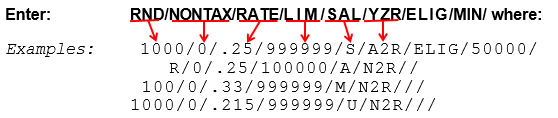
|
RND |
The Rounding factor to be applied to the eligible earnings. RND can be set to '0' (zero) for no rounding, '1' to round up the next higher dollar or 'R' to round to the nearest dollar. To round to the next highest, you can also enter 10, 100 or 1000. |
|
NONTAX |
The Non-Taxable amount of insurance. This no longer applies Canadian payrolls and should be set to zero. |
|
Rate |
The total Rate per thousand. |
|
LIM |
The coverage Limit. Enter 999999 if no limit applies. |
|
SAL |
Refers to the type of Salary used for the calculation of the insurance coverage. |
|
M |
Indicates the current pay period eligible is to be used. |
|
A |
The Annual eligible generated by multiplying the current eligible by the number of periods on the employees pay cycle code. |
|
I |
The annual eligible generated by multiplying the current eligible by the number of salary periods on the employees pay cycle code. This option will use the regular number of periods from the pay cycle if the number of salary periods is blank. |
|
S |
Indicates to use the pre-calculated As Of Salary. |
|
F |
Indicates the actual insurance coverage is to be pulled from the employees' deduction limit field. |
|
E |
This deduction formula applies the Step calculation before the eligible earnings are annualized. 'E' indicates that the eligible earnings should be annualized before the step calculation is done. This small change in the order of the calculations can affect the outcome of the premium amount due to rounding factors. This option generates the annual eligible earnings by multiplying the current eligible by the number of salary periods on the employee's pay cycle code. This option will use the regular number of periods from the pay cycle if the number of salary periods is not filled in. |
|
V
|
The annual eligible earnings generated by multiplying the current eligible by the number of pay periods on the employees pay cycle code. For employees that are ON LEAVE With Benefits, the AS OF Salary will be used in determining the coverage amount. |
|
B |
The annual deduction eligible earnings would come from the employee's AS OF Salary unless the AS OF Salary is zero. When the AS OF Salary is zero then the employee's Annual eligible will be generated by multiplying the current eligible by the number of periods on the employees pay cycle code, as done by SAL type 'A'. This option allows for the use of A with overrides for selective employee who would have an AS OF Salary defined. |
|
U |
This formula annualizes the eligible earnings and applies the RND factor before applying the Step calculation. The order these calculations are done effects the premium results. This option generates the annual eligible earnings by multiplying the current eligible by the number of salary periods on the employee's pay cycle code. This option will use the regular number of periods from the pay cycle if the number of salary periods is not filled in. |
YZ or YZR are entered as one unit where:
|
AGE |
Defines where the Age value will be taken from. |
|
|
'A' Uses the predefined As Of Age. 'N' Uses the employees actual age based on the employees' birth date. Enter 'N' if the age is not applicable. |
|
Z |
Refers to the type of calculation to be used for the taxable benefit portion of the deduction amount (if the deduction code is listed as a taxable benefit on the income tax deduction) where you enter: 1 Allows the employer's paid portion to be used as though the employee paid the full premium up to the maximum non-taxable. This has the result of reducing the taxable benefit. Use of this method may require a clause to exist in the union contract before CRA will accept the use of this calculation. or 2 The traditional method of allocating taxable benefits. It takes the employer's portion of the premium for the coverage in excess of the allowable maximum. |
|
'R' |
Triggers a coverage report to be produced during the payroll processing. |
'ELIG'
The 7th parameter may be left empty or enter ELIG to indicate you want the employee's life insurance coverage from the Group 3 Type 5 deduction to be stored under the eligible earnings field on the history record. With the coverage stored in history you then have the option to use the Life Insurance Coverage Comparison report.
You can store the coverage amount in the limit field on the employee master deduction screen. If you use 'As of Age/Salary Update' (2.12.1) to calculate a salary and age at a fixed point in time, then you can use 'Employee Update As of Age/Salary' (2.12.5) to calculate the amount of the deduction and the coverage. These calculated amounts are stored in the employee deduction record. The amount is stored in the amount field and the coverage is stored in the limit field. If you use 'F' for parameter 'X', the deduction amount will be calculated using the coverage stored in the limit field. This will allow you to override the calculated coverage when necessary (e.g. singles get flat $5,000 coverage.)
The 6th parameter may include a specific coverage limit amount which determines the employer share ratio.
e.g. 1000/Ø/.25/999999/S/A2;40000/
The ';40000' included on the 6th parameter defines that any coverage below the 40000.00 is a 'Benefit', while any premium coverage over the 40000.00 is paid by the employee.
Group 3 Type 6
This is a life insurance deduction. It is calculated based on a rate per thousand multiplied by an actual coverage amount by hourly rate. The calculation of actual coverage is: Coverage start + (Coverage increment * X) where X is (Actual hourly rate - Rate start) / Rate increment.
Group
-
Enter '3'
Type
-
Enter '6'
Factor
Limit
Share %
Employer's percentage of deduction divided by the employee's percentage of deduction.
-
Enter 'Benefit' if employer pays 100%.
Step
-
Enter RS/CS,RI/CI, - where RS is the hourly rate start, and CS is the coverage start, and RI is the hourly rate increment, and CI is the coverage increment.
Extras
Enter RND/NonTax/Rate/Lim/X/ - where RND is the rounding factor to be applied to the eligible earnings, and NonTax is the non-taxable limit, and Rate is the total rate per thousand, and Lim is the coverage limit, and X is 'M' if the current pay period eligible is to be used, or 'A' if the annual eligible is to be used.
Group 3 Type 7
This life insurance deduction calculates based on the annualized salary reduced to monthly or divided by 12. This deduction can be used two ways. When no Step definition this defined, the deduction is simply a rate per $100 of coverage. The Step definition allows the deduction to calculate a percentage of monthly earnings to a limit with a second percentage for monies over limit1 to a maximum of limit2. The Step calculation annualizes the eligible earnings based on the employee's pay cycle. The annual salary is then rounded up to the next whole dollar before dividing by 12 (or override number of months) to generate the monthly salary.
Group
-
Enter '3'
Type
-
Enter '7'
Factor
Limit
Share %
Employer's percentage of deduction divided by the employee's percentage of deduction.
-
Enter 'Benefit' if employer pays 100%.
Step
-
Enter per1/LIM1,per2/LIM2, - where per1 is the percentage of monthly earnings up to LIM1 to be used, per2 is the percentage of monthly earnings over LIM1 to be used. LIM2 is the maximum amount of reduced monthly earnings to be used. The results of the monthly earnings multiplied by the percentage is rounded up to the next whole dollar before the rate is applied.
E.g. .60/7500.00,.50/10000,
Extras
-
Enter Rate/AN/Limit/perS/Update/, or Rate/A/Limit/perS/, where Rate is the monthly rate amount and AN indicates to use the annualized eligible earnings, A indicates to use the As of Salary. The Limit is the total annualized earnings limit.
perS is an override to the number of periods (12) used to generate the monthly amount, may be left blank if not needed.
When no Step is defined, the Rate is a rate per $100 of coverage.
Update allows you to have the system store the deduction calculation value (Step results) in the Limit field and the employee's deduction taken on the Amount field of the employee master deduction screen. When Update is defined, the results for this deduction from the Payroll Processing run will be updated on to the employee's deduction master during the Payroll Update. These values on the employee's master are purely informational. This feature would only apply to the Step formula.
e.g.
.47/A/ No Step and using AS OF Salary
.0296/AN/222000/10/ Step formula with annualized eligible
.0296/AN/222000// perS only required to override 12 months
0296/AN/222000//Update/ Step formula with 12 months and employee deduction update is active
Group 3 Type 8
There are two parts to this deduction. The first is the basic insurance and is paid for by the employee or the employer. The second is optional insurance coverage and is paid by the employee. The employee can have the basic or the optional life insurance, but not both at the same time. Employee and employer can be taken at the same time.
The basic coverage is the employee's eligible annual earnings times the number of periods from the cycle code. This is multiplied by the rate per thousand (1000) of coverage stored in Field 16 (Extras).
The optional coverage is stored in the amount field of the deduction on the employee master deductions. The amount field may be maintained in the following ways:
1. Use Field 08 (Factor) in the deduction data base and use global update to maintain it. Use this method if all or almost all employees get the same coverage.
2. Use a table (Field Y) and create a deduction table entry for each coverage amount. Use this method if the coverage is in specified units which limit the choices. This will allow you to change a table of the coverage amounts and then use the table update to update coverage on the employee deduction record.
3. Use employee deduction changes and enter the actual coverage amount into the amount field on the deduction screen for each employee. This is the method to use if the freedom of choice allows each employee to have a different amount.
The rate for the employee's coverage is based on the employee's age. This deduction can use the As Of Age or the employee's actual age based on the birth date. To use the As Of Age you must run the 'As of Age/Salary Update' to establish the As Of Age. The age is used to scan Field 15 (Step) to find the proper age and rate per thousand (1000) of coverage. The scan selects the first step where the age is equal to or greater than the age for the employee. It then selects the rate from this step. The rate is divided by 1000 and then multiplied by the coverage amount.
Group
-
Enter '3'.
Type
-
Enter '8'.
Factor
-
Enter if the amount is to be supplied through another method or if the employee is paying for the basic coverage.
-
Enter the coverage amount if the coverage amount is uniform for all employees and the employees only pay for the optional coverage.
Limit
Share %
Step
-
Enter Rate/AGE, where rate is the rate per thousand (1000) dollars of coverage and age is the specified as the upper limit of the employee age group that fits that rate.
e.g. .07/34,.10/44,.29/54,.64/64,1.92/69,2.88/99,
Extras
-
Enter Rate/RND/RE/AGE Type/ where:
Rate is the employer rate per thousand (1000) dollars of basic coverage.
The employer rate must be zero if no employer share is required.
-
RND is the rounding value to be used in calculating the deduction.
-
R is the salary type to be used for calculating the employers share. The employer element Must be entered even when no employer share is to be calculated.
-
E is the salary type to be used for calculating the employee's deduction.
Salary types include:
|
A |
Annualized eligible earnings. This option is the default. |
|
S |
Use the previously calculated As Of Salary. |
|
O |
Use the As Of Salary if the As Of Salary has a value greater than zero. If the As Of Salary is less than or equal to zero, use the annualized eligible earnings. (NOTE: This is not a zero). |
AGE Type defines where the employee's age will be taken from.
-
Enter 'N' to use the employee's actual age based on the employee's birth date.
-
Enter 'A' to use the As Of Age. The As Of Age is the default if this element is left blank.
e.g.
.32/1000/SS/N/
employer rate .32 per thousand coverage if from As Of Salary for both the Employer and Employee. The employee's age is calculated from the birth date.
0/1000/AA/A/
no employer rate and the employee's coverage are based on the annualized earnings using the As Of Age.