
Once the statement successfully imports, you will want to notify cardholders that transactions are ready for review and update (if needed). For more information on setting up Notifications, refer to the Settings section of this document. Access to the Notifications page is controlled by you Role permissions.
-
Click Notifications in the left-hand navigation menu
-
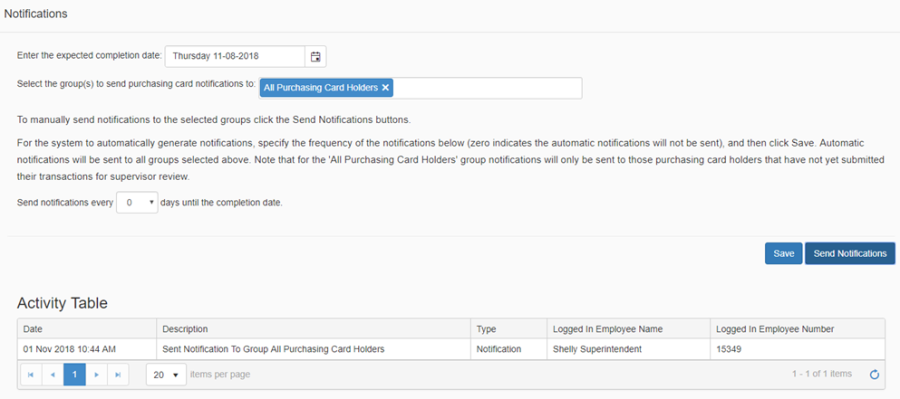
Enter the date that you would like cardholder reviews to be completed by. By default the system sets the date to one week from the current date. When the notification is sent, the date is included in the email message, so that the employees know when they are to complete their updates by.
-
Select the group(s) to send notifications to. For example, selecting the group 'All Purchasing Card Holders' will send email notifications to all purchasing card holders with transactions associated to the current imported statement, this is a system defined group.
-
If you would like the system to automatically send out reminder email notifications to those employees that have not yet reviewed and submitted their transactions, then enter the interval for the automatic notifications, for example every '1' day until the completion date as previously defined, and then click Save.
-
Otherwise, to send notifications right away, or for later ad hoc notifications, click Send Notifications
-
The Activity Table displays a listing of the notifications that have been sent either manually by the logged in user or automatically by the system, that pertain to the current statement file.
-
The system automatically sends notifications to Supervisors and Final Reviewers based on a schedule defined on the Settings page. Refer to the Settings section of this document for more details.
-
The system automatically sends notifications to selected groups based on the schedule defined on the notifications page (i.e. every '1' day until completion date)
-
The system will send out manual notifications to selected groups when initiated by the logged in user. Each group can have a custom notification message as defined in the Settings.
-