
Once all transactions have been reviewed and updated (as required) i.e. purchasing card holders have reviewed and submitted for supervisor review, the supervisors have reviewed and submitted for final review, and the final review is completed then the statement can be invoiced. Access to the Invoice page is controlled by your Role permission.
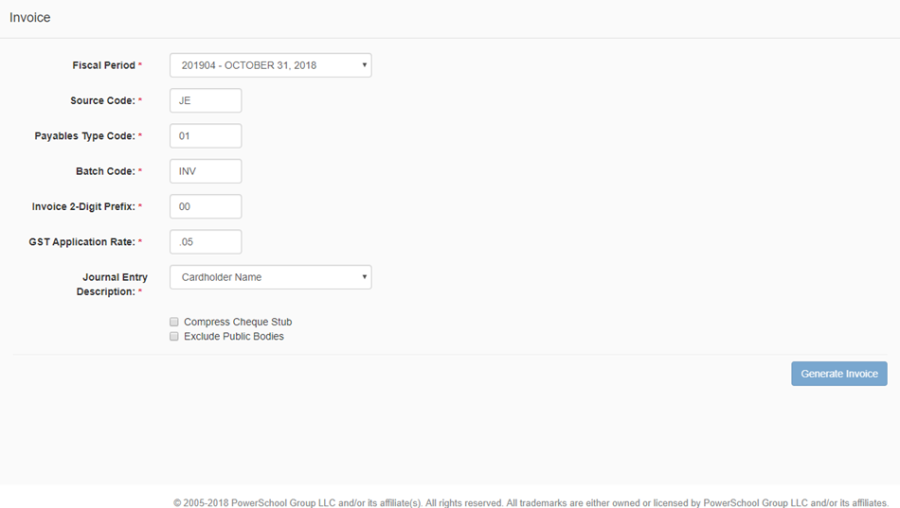
-
Click Invoice in the left-hand navigation menu
-
Fiscal Period, defaults to the current fiscal period, but can be modified if needed.
-
Default values for the remaining fields can be defined in Settings, if no defaults are defined then the fields will be blank. Default values, if exist, can be modified if needed.
-
Enter or accept values for the following fields
-
Source Code
-
Payables Type Code
-
Batch Code
-
Invoice 2-Digit Prefix
-
GST Application Rate
-
Journal Entry Description
-
Compress Cheque Stub
-
Exclude Public Bodies
-
-
Click Generate, and the invoice will be created. Note that you will need to go to atrieveFinance to view and pay the invoice. Once an invoice is generated, the 'Generate Invoice' button is disabled, preventing users from creating a duplicate entry. In addition, once a statement is invoiced the transaction status for all records is automatically updated to the status of 'Invoiced'.