
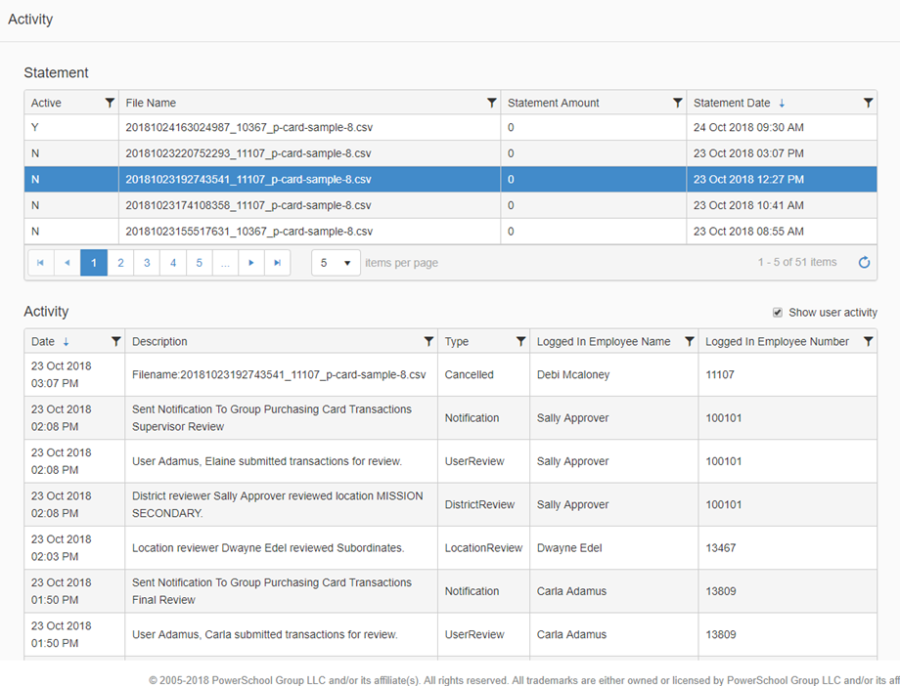
The Activity page provides users with a way to view the activity associated to the current active statement file, or statements previously uploaded. Access to the Activity page is controlled by your Role permission.
-
Click Activity in the left-hand navigation menu
-
Click on a row in the Statement grid and the Activity grid (located below statement grid) will populate with the activity associated to the selected statement
-
By default, user activity is not displayed, but if you would like to view individual user activity click on the 'Show user activity' check box
-
The activity is organized by the date of the update and includes the description, the activity type, the name of the employee that initiated the change and their employee number.
-
Types of Activity:
-
Uploaded – when the statement was uploaded
-
Notification – when notifications are sent
-
User Review – when the individual purchasing card holder has reviewed and submitted transactions for Supervisor review
-
Supervisor Review – when the supervisor has reviewed and submitted transactions for final review
-
Location Review – when the location reviewer has reviewed and submitted transactions for final review
-
Final Review – when the final reviewer has reviewed, and the statement is ready for invoicing
-
Invoiced – when the statement is invoiced
-
Cancelled – if/when the statement is canceled
-
-
Note that all columns in the Statement grid and the Activity grid can be further filtered by clicking the filter icon
