
The Workflow Activity page provides details about all tokens that traverse the workflow. Workflows is only integrated with Journal Entry at this time, so the activity is specific to this module. Each time a journal entry is created and saved a token is created.
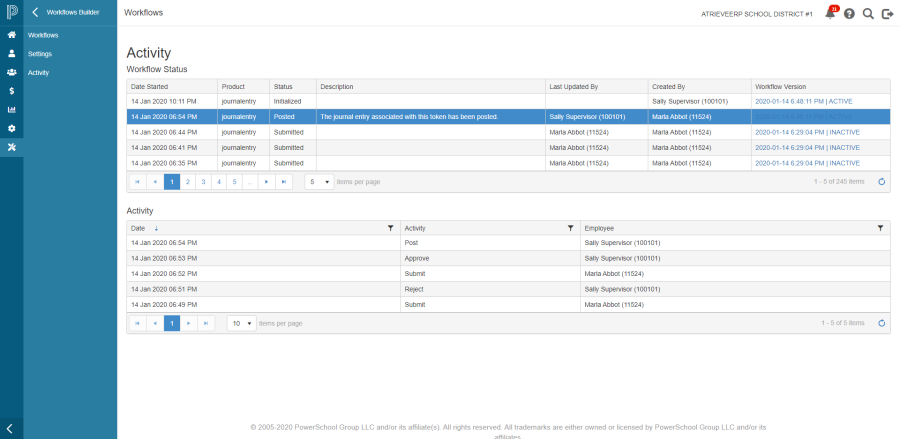
The table at the top of the page provides a brief overview of the status of a token. Statuses include:
-
Initialized – this is the status for journal entries that have been created and saved but not submitted
-
Submitted – this is the status for journal entries that have been submitted for approval
-
Approved – this is the status for journal entries that have been approved
-
Rejected – this is the status for journal entries that have been rejected
-
Posted – this is the status for journal entries that have been posted to atrieveFinance
Additional important information in the table includes:
-
The date and time that the token entered the workflow (i.e. when the journal entry was created)
-
The associated product – only Journal Entry currently
-
Description
-
Last Updated By
-
Created By
-
Workflow Version – as you may have transitioned from one workflow configuration to another, this field will tell you specifically the workflow that the specific token is traversing.
Note that if you decide to publish a different version of the workflow, only new tokens created will follow the new path. All previously generated tokens will continue to follow the previous workflow until completion – in the case of journal entry, this would be once the journal entry is posted to atrieveFinance.
Clicking on a row in the top table will populate the bottom table with specific details related to the activity for that token. Details include:
-
Activity date and time (i.e. when the status changed)
-
Activity (i.e. Submit, Reject, Approve, Post)
-
Employee - the name and number of the employee who performed the action