
The Ontario SBCI Extract Process generates the SBCI extract file(s) for one or more payrolls. This option will generate the Permanent or LTO extracts based on the selection criteria defined in the SBCI profile. The exact directory location and full name of the extract file is included on the report header. This extract file is available from the Excel button or the Payroll Download File Process on the main menu. The report for this extract details the values used for the generation of the extract file.
Extract file contents and sources:
Sick Leave Top-Up (Permanent) and Sick Leave Top-Up (LTO-LTS)
|
Column |
Column Name |
Column Description |
|
A |
Bargaining Unit |
Position code bargaining unit description. |
|
B |
Employee Group |
Position code employee category description. |
|
C |
Employee Unique ID |
Employee Number |
|
D |
Position Title |
Employee position description. |
|
E |
Gender |
Gender - 'M' for male, or 'F' for female. Blank when not M or F. |
|
F |
Date of Birth |
Date of birth for the employee. |
|
G |
Service Date |
Date the employee started receiving employment benefits. For Perm: Uses Seniority date from HR demographics. For LTO: Uses start date of assignment. |
|
H |
Employment Standing |
Permanent or LTO. Will display Permanent when running any report for permanent employees and will display LTO when running any report for LTO. |
|
I |
Employment Status as at Aug 31, of the given reporting year |
When employee has a hire record where the termination date falls within the reporting period, then the termination reason description will be reported. As of August 31, if an employee has an assignment where assignment type field Leave Y/N = Y, then the description of the assignment type is reported. Otherwise reported as Active. |
|
J |
Status Effective Date |
Relating to Employment status as of August 31 of the reporting year. When reporting termination status in Employment Status field, then reports the termination date. When reporting leave employment status, reports the start date of the leave assignment. Otherwise, is left blank. |
|
K |
10 or 12 Month Work Year |
"10" or "12" to identify 10 or 12 month Employees. Reports “12” months unless employee’s assignment is defined as School Term = Y, then will report 10 month. |
|
L |
Full Time Equivalence (FTE) |
FTE per employee’s Assignment Assigned FTE. For Hourly employees the FTE is calculated by dividing the employee assigned hours per week by the hours per week from the position code. |
|
M |
Annualized Salary |
Employee’s annualized salary as at August 31, of the given reporting year, on a full-time basis. Salary as per date, per HR Assignment is annualized based on the Pay Type and Pay Cycle from the HR assignment using the number of pay periods for the pay cycle from the applicable payroll database. |
|
N |
Carry Over Sick Leave Days as at Aug 31, of the previous reporting year |
Number of sick days carried over from the previous school year reporting period school year as of August 31, of the new reporting period (i.e. carried over from 2023/2024 school year as of August 31, 2024). Pulls the Clear record entry from 100% bank for 1 year and 30 days prior to reporting end date to reporting end date minus 30 days, pulling bank clear entry “CL” Hourly values converted to days using employees HR Assignment hours per day. |
|
O |
Number of 100% Paid Sick Days Allocated for the reporting year. |
Number of 100% paid sick days allocated for this employee. Pulled from 100% banks for bank transaction types: IN, AC, EJ, AJ for 1 year and 30 days prior to reporting end date to reporting end date minus 30 days. Hourly values converted to days using employees HR Assignment hours per day. |
|
P |
Carry Over Sick Leave Days as at Aug 31, of the current reporting year |
Number of sick days carried over from the current reporting year (i.e. number of sick days carried over from the 2023/2024 school year as of August 31, 2024). Pulls the Clear record entry from 100% bank for reporting end date (+- 30 days) and based on a bank clear entry CL. Hourly values converted to days using employees HR Assignment hours per day. |
|
Q |
Total Number of Paid Sick Days |
Total number of sick days paid at 100% and 90%. Is total of column O and column P. |
|
R |
100% Paid Days |
The number of 100% paid sick days the employee used between September 1 and August 31 of the given reporting year. Include all days that are paid out of the sick leave/STD plan with top-up. Pay codes as defined by user as 100% paid and 90+10% paid. The 90% plus top up must have matching dates to count as 100%. |
|
S |
90% Paid Days |
The number of 90% paid sick days the employee used between September 1, and August 31, of the given reporting year. Pay codes as defined by user as 90% paid with no parallel top up for the same date. |
|
T |
Total number of Unpaid Sick Days |
The total number of unpaid sick days the employee used between September 1, and August 31, of the given reporting year. Based on Absence Unpaid Sick Codes defined. |
|
U |
Not Applicable for Permanent Employees |
Not Applicable for Permanent Employees. |
|
V |
Not Applicable for Permanent Employees |
Not Applicable for Permanent Employees. |
|
W |
Number of Days Worked Per Year |
For Permanent reporting, reports the default working days per year per pay id unless the employee’s Employee Type Code (from HR Assignment) has an override to the “Annual Hours Or Days” field. |
Legend For Absence Codes
|
Column |
Column Name |
Column Description |
|
A |
Absence Code |
Absence codes used within date range selected. Pulled from absence details. |
|
B |
Absence Description |
Description per Absence code database using **MASTER** absence key. |
|
C |
Paid / Unpaid |
From Paid Leave field on Absence Code database using **MASTER** absence key. |
|
D |
Absence From Sick Leave? |
‘Y’ when absence code is defined with corresponding sick leave pay code to defined on extract. |
|
|
|
|
Absence Reporting – Permanent / LTO
|
Column |
Column Name |
Column Description |
|
A |
Employee ID |
Employee number |
|
B |
Start Date |
Timesheet date |
|
C |
End Date |
Timesheet date |
|
D |
Absence Code |
Absence code on timesheet |
|
E |
Absence FTE |
FTE of absence as of time on timesheet |
|
F |
100% Paid Sick Days |
Days taken per 100% sick storage bank and 90% & Top Up combined. |
|
G |
90% Paid Sick Days |
Days taken per 90% sick storage bank. |
|
H |
0% Paid Sick Days / Unpaid Sick Days |
Days per unpaid sick leave. |
Select Extract Type to Generate
-
Select ‘P’ to generate the Permanent Sick Leave Top-Up
-
Select ‘L’ to generate the LTO Sick Leave Top-Up
-
Select 'G’ to generate the Legend for Absences
-
Select 'A’ to generate the Absences for Permanent
-
Select 'B’ to generate the Absences for LTO
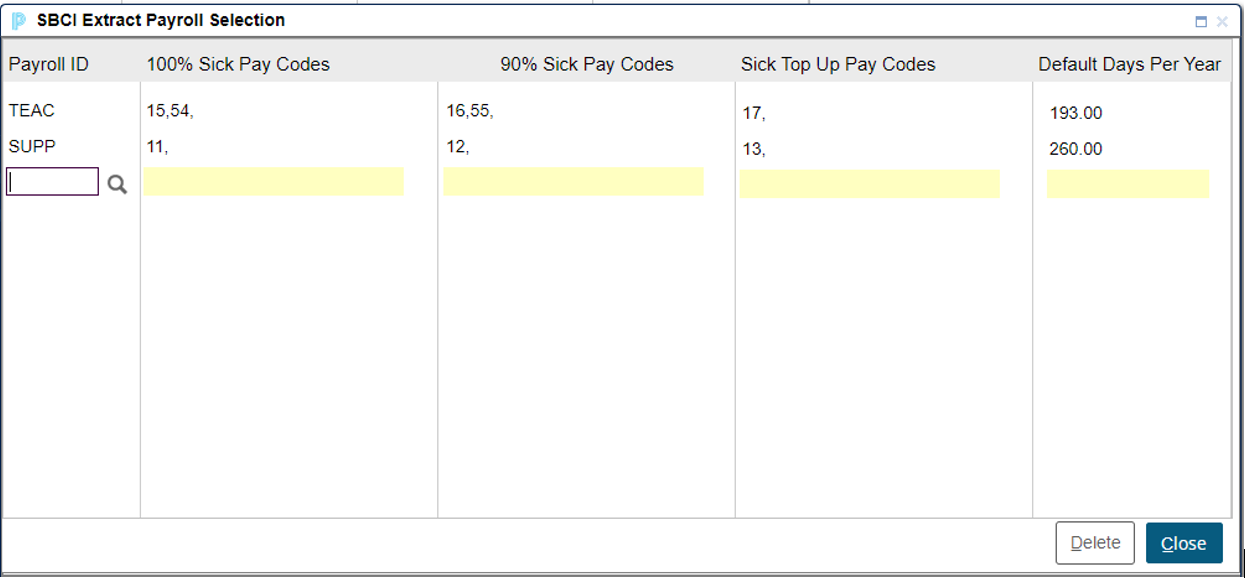
Select the Pay Ids followed by the applicable pay codes used for 100% Sick Leave, 90% Sick Leave, Sick Leave Top up and the default number of Days Per Year. Do not repeat payroll ids.
Starting Date for Date Range of Reporting Period
-
Enter the starting date for the reporting period. Determines the starting date range for various fields on the extract.
Ending Date for Date Range of Reporting Period
-
Enter the ending date of the reporting period. Determines the ending date range for various fields on the extract.
Unpaid Sick Leave Absence Codes
-
Enter a list of Absence Codes that represents the unpaid sick leave. The process will scan timesheets for the defined absence codes, for the defined date range, to determine the number of unpaid sick days. Hourly balances will be converted to days based on the hours per day on the HR Assignment.
Reporting
The report header includes the full extract file name and location.
The reports lists the following information detailed below:
Sick Leave Top-Up (Permanent) and Sick Leave Top-Up (LTO-LTS) report:
-
Employee number and name
-
Payroll Id code
-
Assignment Type Code
-
Position Code
-
Position Type Code
-
Assignment FTE / Hours
-
10 or 12 months
-
Hours Per Week
-
Hours Per Day
-
HR Pay Rate used.
-
HR Pay Type Code used.
-
HR Pay Cycle Code used.
-
Annualized Salary at 100% FTE.
-
Employee’s HR Employee Type Code.
-
Days per Year defined per default or overridden by Employee Type code Annal Days
-
“OV” flags those employees where the Days per Year were overridden.
-
Total number of employees reported.
-
Total number of records reported.
Legend For Absence Codes report:
-
Absence code used for date range of report.
-
Absence description per Absence database.
-
Paid leave Y/N per Paid Leave field on absence database.
-
Sick Leave Y/N per pay code match to sick leave pay codes on absence vs report.
-
Total number of absence codes reported.
Absences, Permanent and LTO-LTS report:
-
Employee number and name
-
Payroll Id code
-
Assignment Type Code
-
Position Code
-
Position Type Code
-
Timesheet date
-
Timesheet hours
-
Assignment FTE / Hours
-
Hours Per Day
-
Timesheet FTE
-
100% Sick Days (100% plus 90% & Top Up)
-
90% Sick Days
-
Unpaid Sick Days
-
Total number of employees reported.
-
Total number of records reported.