Overview
-
In 2018, the CRA (Canada Revenue Agency) informed districts that they are required to submit pension adjustments on a go forward basis starting in 2018, and for non-statute years 2015 – 2017.
-
The Pension Plan Corporations adjusts or corrects prior year employee RPP contributions based on the annual reporting by the employer.
-
Each year in June and November the Pension Corporation will provide the district with prior year pension adjustments report in PDF format. The district is expected to make the adjustments and submit the amended T4’s to the CRA.
Pension Adjustment Import Process Implementation
-
The solution is implemented is to provide the ability to mass update amended pension adjustments for employees for prior years and re-submit to CRA.
-
Enhance T4 Statement Regeneration and T4 Amended Statement processes with the ability to reload PA amounts.
-
With this implementation, payroll users will save time and reduce errors by being able to import amended pension adjustment amounts to be used in the T4 XML Creation process, T4 Statement Regeneration and T4 Amended Statement processes.
The APA import file must contain the following fields:
-
Employee’s SIN
-
Employee’s last name
-
Employee’s first name
-
Employee’s birthdate
-
Employee’s number, may be blank
-
Employee’s APA – Full Amended Pension Adjustment amount for the year
-
Taxation year, override to default entered at run time
-
Reason for change (Amend)
-
Reporting date
Pension Adjustments
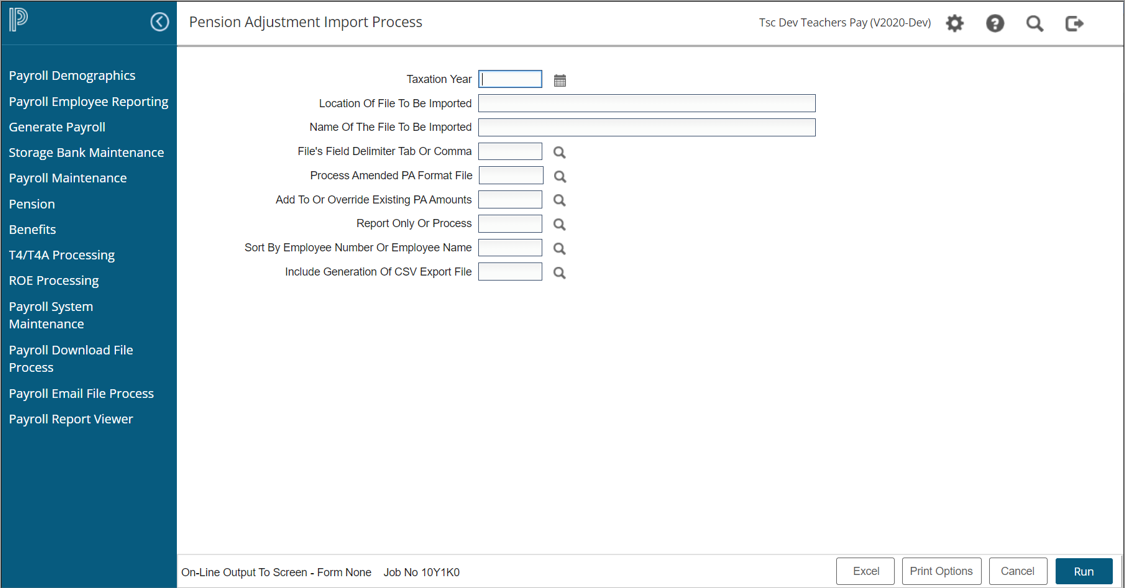
To perform pension adjustment import, navigate to Payroll > T4/T4A Processing > T4/T4A Pension Adjustment > Pension Adjustment Import Process.
-
Select the ‘Taxation Year’
-
Click on Upload icon to upload the document in ‘Location of file to be imported’ prompt
-
‘Name of the file to be imported prompt’ will get automatically filled in once the document is uploaded in the previous prompt
-
Select the import document to be tab/ comma delimited from the ‘File’s Field Delimiter Tab or Comma’ lookup.
-
Select ‘Process Amended PA Format File’ as Yes/No
-
Select Add to/ Override PA Amounts from ‘Add to or Override existing PA Amounts’ lookup
-
Select the import to be for report/process from ‘Report only or Process’ lookup
-
Select the sort criteria from ‘Sort by Employee Number or Employee Name’ lookup
-
Select Yes/No from ‘Include Generation of CSV Export File’ lookup
-
Pension Adjustments can be run for each payroll group that requires amendment
-
Note- pension adjustments are run once per payroll group; the file you import may include multiple years.
-
-
When you select to import using the amended PA values, the option to Override the PA amount will be defaulted as this will normally be an override PA amount.
-
To review the adjustments for accuracy before final processing, select ‘Report Only’ (R). Once satisfied with the adjustments to be made, select 'P' to process.
-
An Excel export file will be created containing all the accepted PA adjustment entries. This export will include the import entry number of each entry with the intent of supplying an easy reference as to which imported entries have not been processed for the import file. This feature will be very helpful when the import file contains data for multiple payrolls.
T4 Amended Statement Processing
-
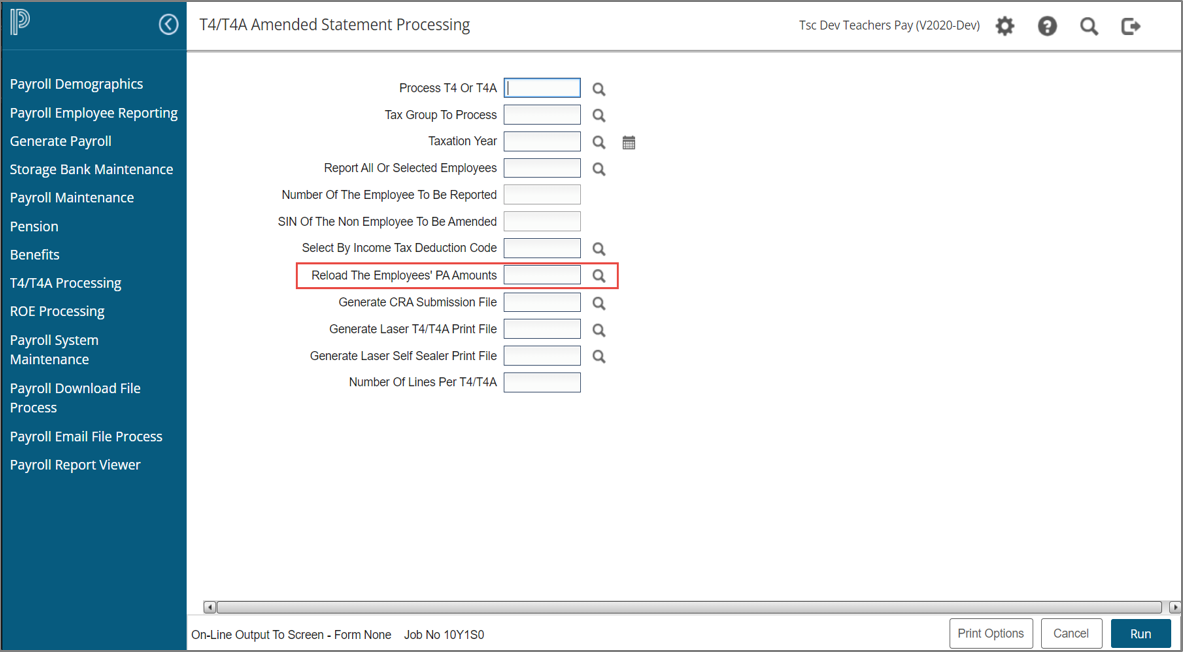
To perform T4 statement amendments, navigate to Payroll > T4/T4A Processing > T4/T4A Amended Statement Processing
-
The T4 Amended Statement process has been updated so that anytime you need to reissue an amended T4 you can choose to include the new pension adjustment amount.
-
This is equivalent to the current process in Statement Maintenance where you would update an employee adjustment amount manually, except that with this new process you may update multiple employees, all at one time.
-
-
A new prompt has been added ‘Reload the Employees’ PA Amounts' - select 'Y' Yes Reload PA
T4 Statement Regeneration
-
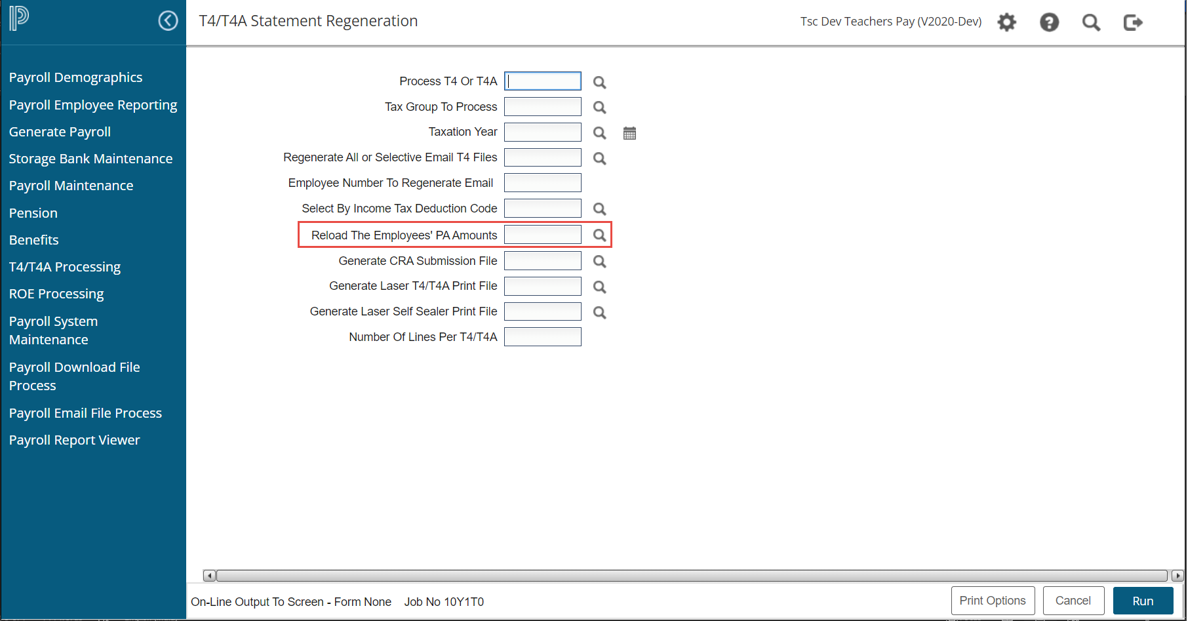
Navigate to Payroll > T4/T4A Processing > T4/T4A Statement Regeneration
-
The option to ‘Reload the PA Amount’ during T4 Statement Regeneration allows you to pull in revised PA amounts without having to recreate the T4 Statements, thus no changes will be overwritten.
T4 XML Creation
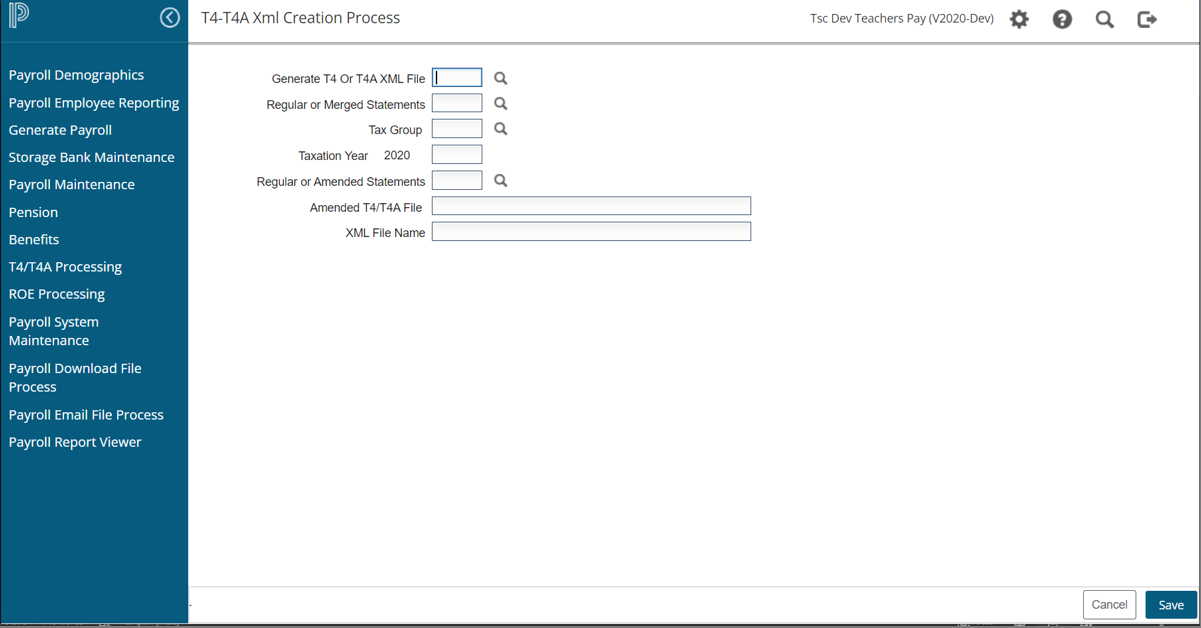
To submit the pension amendments to CRA, navigate to Payroll > T4/T4A Processing > T4/T4A Pension Adjustment >T4/T4A XML Creation
-
Run the process for each year that has adjustments.
-
After the file has been downloaded to your system, you may send to CRA for further processing.