
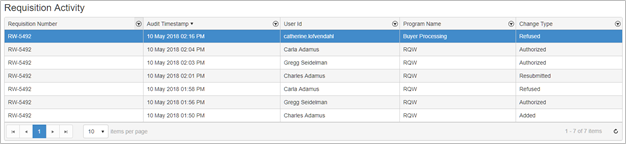
The new Requisition Activity table provides you with a quick way to view the status of a requisition through its lifespan.
The following processes are recorded:
-
Requisition Create
-
Requisition Changes
-
Requisition Authorization (authorize or refuse)
-
Requisition Delete
-
From the Requisition menu select the new Requisition Activity menu item or go to Requisition Search, search for and select a requisition and then click on the Activity link in the details section of the requisition.
-
The requisition activity table includes the following columns:
-
Requisition Number – displays the requisition number
-
Audit Timestamp – displays the date and time of the activity
-
User ID – displays the name of the user associated to the activity
-
Program Name – displays the product associated to the activity (i.e. RQW or Buyer Processing)
-
Change Type – displays the activity type (i.e. Added, Authorized, Refused, Resubmitted)
-
-
To further filter the contents of the grid, select the filter icon in the column to filter by
-
Clicking on the filter icon will open the filter criteria window. Enter additional criteria and then click the Filter button. To clear the filter, click the filter icon again and then select Clear.