
Product Version Support
In general, at any given point in time, Atrieve will provide:
-
Customer Support Services for the current released version of the Product plus one version back.
-
Product Maintenance Services for the current released version of the Product.
Atrieve Support Team
The Atrieve Support Team is available to provide second-level support to designated trained Customer Contacts to assist end users with questions in the day to day operation of Atrieve Products. It is anticipated that Customers will maintain their own internal support group, to provide first-level support for training issues, user errors, inquiries and application/data-related errors, and to co-ordinate local support for their end users.
Case Management Procedures
How to Contact Customer Support
Customer Support can be contacted through the following methods (Canadian, US & International Customers):
Customer Community
https://help.powerschool.com - Support Case Portal
Phone
The phone number for support is 1-866-434-6276.
-
Press 1 for Support
-
Press 1 for New Case
-
Say “Atrieve” when prompted for the name of the product
-
If saying the product of Atrieve was missed after the selection of 1 - New Case:
-
Press 2 for Unified Admin
-
Press 3 for Atrieve
When calling in to inquire about an existing case:
-
Press 1 for Support
-
Press 2 for Existing Case
-
Enter in case number including leading 0
-
Press 1 to confirm
-
Definition of a Support Issue
A support issue identifies a single reproducible or intermittent product issue, data correction or a quick question and answer. A ticket outlines all the activities required to resolve the issue starting from when Customer Support has been contacted.
Our support team assigns every support request a unique ticket number, which is used to track progress, and is provided via email notification once a ticket is created. All items must have a ticket number to progress to a resolution.
Should a client's submission include multiple inquiries or errors, each will be treated as a separate support ticket, and will be prioritized individually. Atrieve reserves the right to assign, prioritize, merge and close support tickets at its discretion. New tickets will not be created when requesting the status of an existing case.
Training requests are not considered a product support issue. Upon review of a support ticket, if the Support Analyst determines the request is not handled under the support agreement, a KTO will be encouraged. See Product Maintenance Services for more information.
Atrieve will accept Service Requests/Tickets from a designated Customer Contact only.
Examples of what is not covered under Support:
-
Training an end user in the operation of the software.
-
Performing a task which is a normal function of the software that should be performed by the customer's end-users.
-
Any services related to 3rd party software not sold or supported by Atrieve, PowerSchool.
-
Installation and configuration of any new software or hardware purchase.
-
Workstation-specific problems due to incompatible web browsers or settings, anti-virus software, unsupported operating systems, or workstation–attached printers.
-
Test account configuration and refreshing
-
Form additions, changes and any form routing modifications (Leave management, HR workflows, etc.)
-
Extensive database changes (absence codes, leave codes and routing)
-
Report writing and Dashboard design
Closing a Support Ticket
A ticket is closed when one of the following situations occurs:
-
The client chooses to close the ticket.
-
The client and the Support Analyst agree upon a working and satisfactory solution to the issue.
-
The cause of the problem is deemed unrelated to any deficiency in the software.
-
The resolution can only be provided by a change to the software, but Atrieve determines—in its reasonable discretion—that such a change is not currently warranted.
-
A resolution has been provided with a status showing it will be available in a future release.
-
If there is no response from the client after 3 attempts to contact over 10 business days, the case may be closed at the discretion of the Support Analyst. The client may re-open the case at any time by contacting Customer Support.
-
Tickets have automated rules that will, in certain conditions, impact the ticket status. One ticket status is "Pending Data".
|
Status |
When Status is Used |
Automated Feature |
|---|---|---|
|
Pending Data |
Additional details have been requested from the client to provide the correct resolution. |
Client will be emailed (3) times and if no response is received the ticket will be closed. |
Escalation Process for Support Requests
If Customers are not satisfied with the current plan of action, they may escalate as follows:
-
Review with Atrieve Technical Support (Either by email or Phone)
-
Review with Atrieve Technical Support Lead (Either by email or Phone)
-
Review with Atrieve Technical Support Manager (Either by email or Phone)
-
Review with Atrieve Account Manager
-
Review with Director, Atrieve Technical Support
-
Review with Atrieve Senior Management
Data Integrity
To preserve data integrity Customers should not enter data into the Atrieve Product databases via other than Atrieve Products. Entering data into an Atrieve Product database by some method other than via Atrieve Products may invalidate the warranty and incur support costs.
Priority and Response
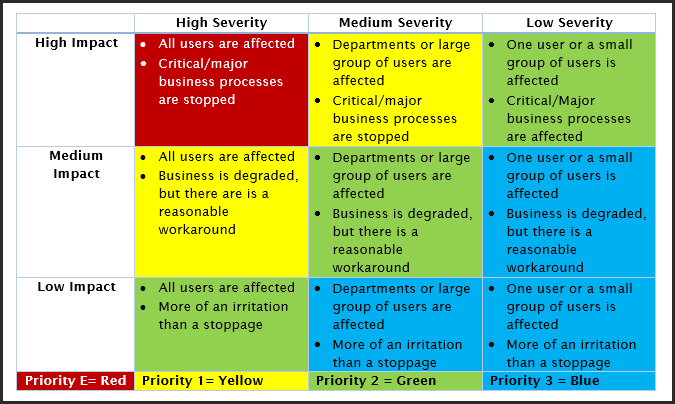
To ensure timely support services, Customers are encouraged to respect priority levels. Customers submit Requests with priority based on the severity of the people affected and the impact of the problem on business continuity. The priority also determines Atrieve's response and potential action related to the Service Request.
Atrieve Priority Response Matrix
The following table is a definition of the Atrieve Priority Response Matrix.
Client Responsibility
First Level Support
It is anticipated that Customers will maintain their own internal support group, to provide first-level support for training issues, user errors, inquiries and application/ data-related errors, to co-ordinate local support for their end users, and to prioritize local requests.
Product Training
Customers will have received training for the Product / Function prior to requesting Atrieve support or submitting any support calls for that Product / Function. The training will have been received directly from Atrieve.
Reinvesting in training is critical to maintaining the health of your ERP system. Districts are encouraged to budget for on-going training through KTO packages and seminars.
Designated Customer Contacts
Customers will assign one or more designated Customer Contacts for Atrieve Products who will be responsible for submitting Customer Service Requests, for co-coordinating responses from Atrieve, and for receiving new Product releases and information bulletins. Atrieve may limit the number of designated Customer Contacts depending on the Product and the relative size of the Customer organization.
Customers should review/update their Customer Contacts as and when required to ensure Atrieve has the proper up-to-date contact information.
Submission of Support Requests
Customers shall make reasonable efforts to replicate, analyze and resolve issues arising from the use of the Product prior to contacting the Atrieve Support Team or to submitting a Service Request.
Customers may only submit Service Requests that apply to versions of the Product that are currently supported by Atrieve (see Product Version Support).
For Support to reach the goal in response times, the following information must be submitted by the client for the Support Analyst to begin work on a support case:
-
Contact information, which may include telephone number and extension, e-mail address, and a direct phone number/extension.
-
Module (subsystem) and version where the issue is being experienced.
-
Severity of problem (see priority level definitions)
-
Detailed description. The information required includes:
-
Steps to recreate the issue
-
What was expected to happen & What happened
-
Error messages, Screen shots, printouts or reports
-
Whether there have been any recent updates to the application
-
Does this happen for other end-users/workstations?
-
Product Maintenance Services
Definitions of the different services offered by Atrieve related to product maintenance:
|
Function |
Description of Service |
|---|---|
|
Development Services |
Atrieve continuously improves its products. These improvements are either functionality/usability enhancements, customizations or defect corrections. Customizations are billable requirements implemented by Development Services, whereas enhancements and defect corrections are part or regular product maintenance and evolution. Enhancements and defect corrections costs are included in support and maintenance agreements. Atrieve will issue periodic upgrades to the Product in the form of new releases and patches and will make these upgrades available for use by Customers. Atrieve will also provide documentation to assist Customers in the installation or operation of the Product, including release notes, information bulletins on the status of the Product and other documentation, as required. |
|
Product Management |
Product Management is responsible to review requests for billable and non- billable enhancements to the product. The Customer must open a service ticket for any enhancement requests. These requests are suggestions that may provide future efficiencies in the software and add increased value to the product suite experience. These tickets are reviewed by Product Management. There is no cost to submit an enhancement request; however, there is no obligation by Atrieve for the selection of the enhancement in a future release. If more control regarding the specifications of an enhancement is developed, or is required in an expedited time-frame, then a quote would be required, and a minimum cost applied. Billable enhancements are collaborative effort between the client, product management and the development team. Once the enhancement request has been defined, a quote is issued to the client which includes approval of scope and installation timeline. |
|
Training & Consulting |
Our Services team specializes in providing training and consulting services to improve and enhance the day-to-day operations of our clients using any of our software solutions. Training is offered to new and existing software users who are not familiar with the various features and functions of our products. Atrieve highly encourages our clients to invest in the training of their staff to ensure successful use of our modules. Consulting services are also available to assist clients in defining their business processes and ensuring they are applying best practices when using our solutions. KTO (Keys to Ownership) program is available for districts to pre-pay for blocks of service time, to be used at their discretion, in consultation with the Atrieve Services team. KTO packages can be used for several different services. These services include and are not limited to:
|
Product Upgrade
Atrieve will issue periodic upgrades to the Product in the form of new releases or patches and will make these upgrades available for use by Customers. These upgrades will include bug fixes, as well as new functionality (enhancements) incorporated into the software. Releases will be accompanied by Release Notes describing the contents of the release, description of changes and implementation instructions.
Statutory Compliance
As part of the Product Maintenance Services, Atrieve will make reasonable commercial efforts to maintain the Product's compliance with mandatory Federal and Provincial statutory requirements related to the Product and affecting Customers. Atrieve will also endeavor to deliver such functionality in a timely manner, recognizing the required schedule for Customers to meet such compliance but also considering the notice period from the Federal or Provincial requirements. In a situation where the change affects each customer differently due to configuration, additional consulting time will need to be purchased to ensure the client follows the new legislation.