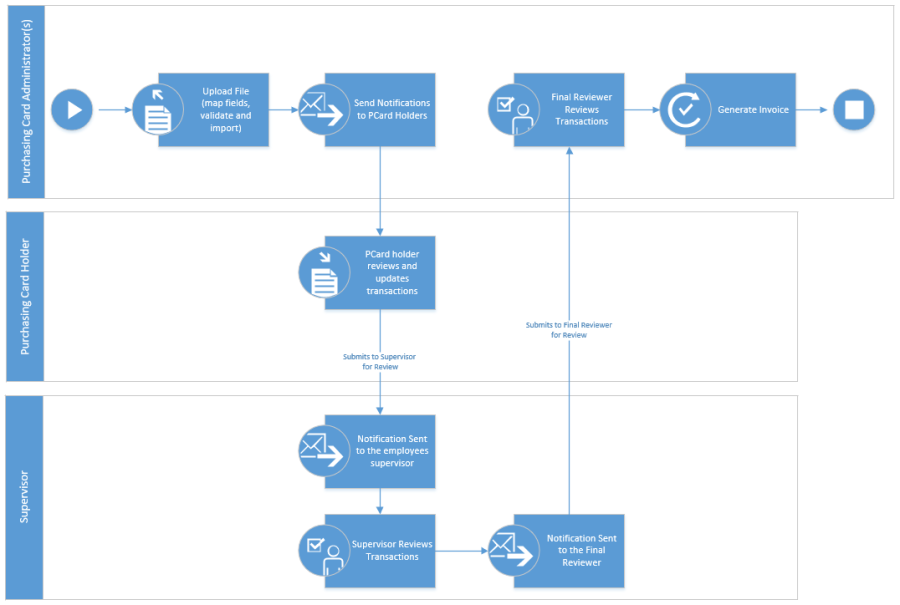
The following steps represent the typical actions and workflow from the upload of a new statement to the generation of an invoice:
-
Purchasing Card Administrator or designee, retrieves monthly transaction statement file from their purchasing card vendor (i.e. BMO, RBC, etc.)
-
Statement file is prepared for import (i.e. may need to modify the raw data from the statement vendor to be imported)
-
Upload file, and validate for errors
-
When the file validates successfully, it is imported
-
Send Notifications to all purchasing card holders that have transactions associated to the current statement to notify them that they have purchases to review and then submit to their supervisor(s) for review
-
Purchasing card holders receive notification, review and update their transactions (i.e. attach receipts), and submit for supervisor review
-
Supervisors receive notification to review their subordinates' transactions; once their review is complete, they will submit for final review
-
Final Reviewers will receive notification that there are transactions to review, and once their review is complete, they will set the transaction records status to Ready for Invoicing.
-
Once all transactions across all employees at all locations are set to a status of ready for invoicing, the purchasing card administrator, or designee can generate the invoice
-
Note that to pay the invoice, you will be required to sign into atrieveFinance and follow your existing process for invoice payment.
General (High Level) Workflow Diagram