
To modify a User or Role’s permission access to Requisitions navigate to Tools > Security & Setup > Role Based Security
-
Select Users in the left-navigation menu to add permissions to a specific employee
-
Select Roles in the left-navigation menu to add permissions to all users assigned to a specific role
Permissions
-
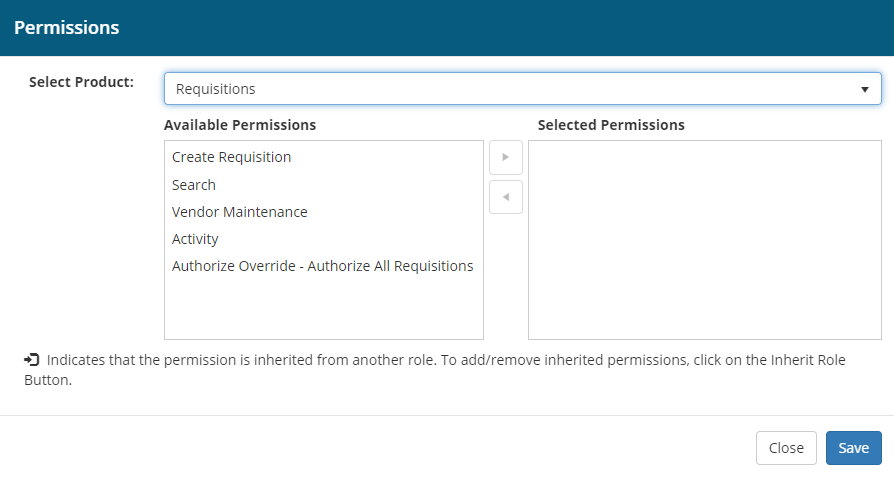
In the Select Product dropdown list select Requisitions
-
The available permissions are listed on the left side of the list mover control, and the selected permissions on the right
-
Click to highlight a permission and then select the right or left arrow as appropriate to move the permission from available to selected or selected to available
-
Once changes are complete, click Save
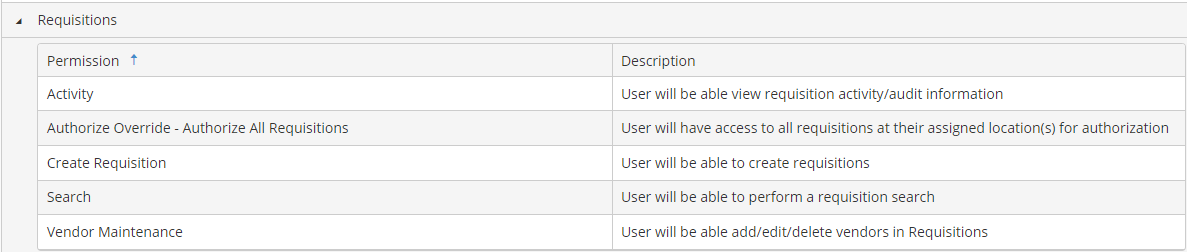
Additional Permission Information:
Note that you may create new Roles specific to requisitions, or you can modify the permissions for existing roles and add appropriate permissions for users that are associated with the Role.