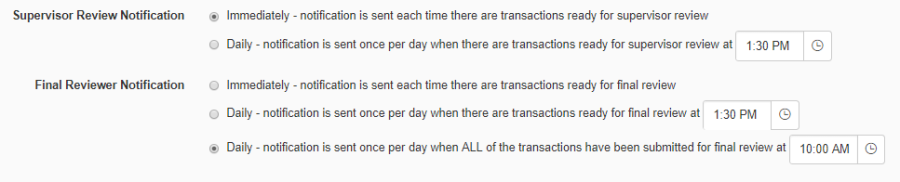
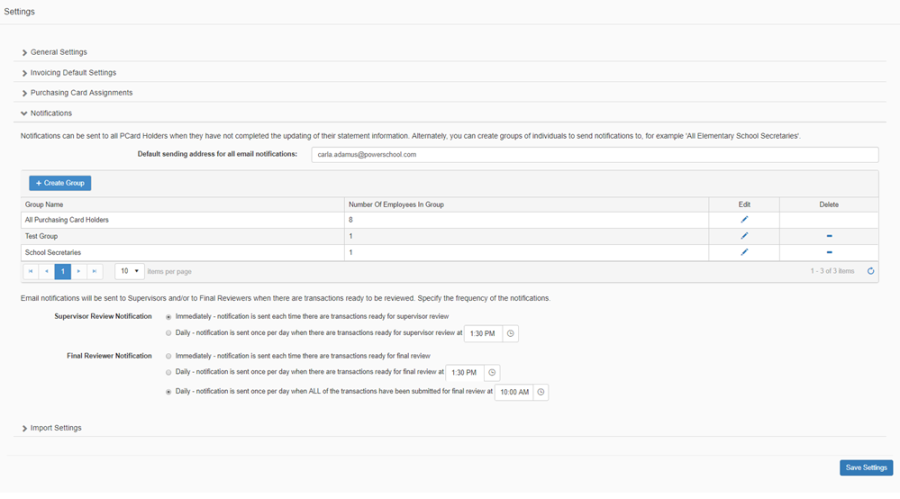
The Notifications section is where you add/edit/delete notification groups, and where you specify the frequency of notifications to be sent to Supervisors and Final Reviewers.
-
Enter the default sending address for all email notifications for your district
-
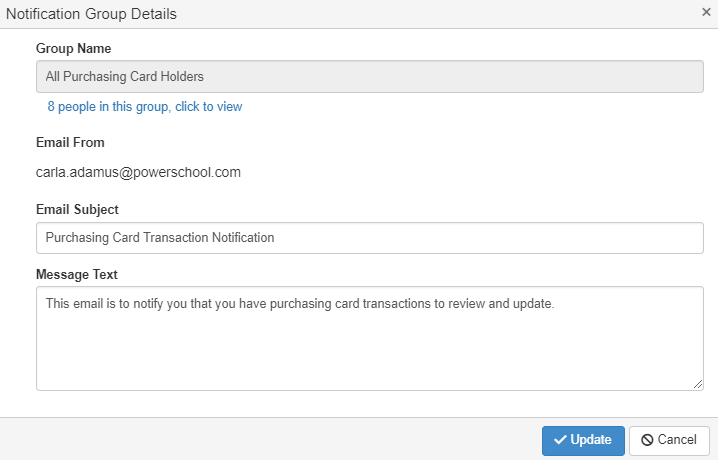
By default, there is one system defined group called 'All Purchasing Card Holders'. This group includes all employees across the district who have a purchasing card assignment. This group cannot be deleted, but you can modify the message text for email notifications for this group.
-
To Add a new group, click 'Create Group' and the Notification Group Details popup will open.
-
Enter a name for your custom group
-
Search/select employees to be included in this group
-
Enter the email Subject Line
-
Enter the email Message Text
-
Note: to remove an employee from the list click on the 'x' next to their name
-
Click Update
-
-
To Edit a previously saved group, click on the corresponding Edit icon
-
To delete a previously saved group, click on the corresponding Delete icon
Notification Frequency for Supervisors and Final Reviewers
Supervisors and Final Reviewers may not want to receive email notifications each time that purchasing card transactions are ready for their review. Notification frequency options include: